![conneqtr-logo-dark.svg]](https://learn.conneqtr.com/hubfs/conneqtr-logo-dark.svg)
In this first phase, the focus is on centralizing and making company-level documents visible within Zen. This already ensures that you have a clear overview of all available company documents today. Enforcing requirements and requesting documents via the action center will be introduced in later phases.
Automatically imported VCA certificates
VCA certificates are automatically uploaded through the integration with the VCA database.
These certificates:
- cannot be manually modified
- can only be viewed or deleted
You can view the certificate details, such as the activities covered by the certification and the validity information.
Consulting documents via a construction site
- Go to the "sites" tab and then click on "subcontractors".
Here you will find an overview of all companies linked to the site. For each company, you can see which documents are available. - Hover over the icons to view the name of the document.
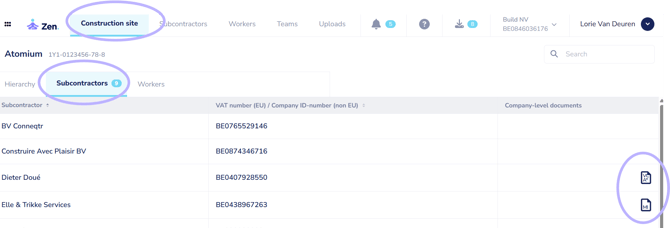
- Click on a company to consult the documents in detail. Within this overview, you can:
- view documents
- edit documents
- delete documents
- add documents
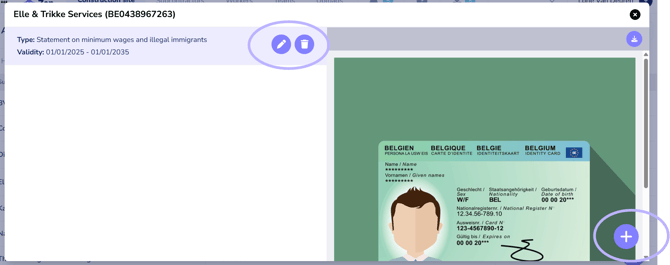
Consulting documents via the "subcontractors" tab
- Go to the general "subcontractors" tab and click on your own company or a subcontractor.
- Then go to the "company-level documents" tab.
Here you will see an overview of the sites for which documents are available. - Hover over the icons to view the name of the document.
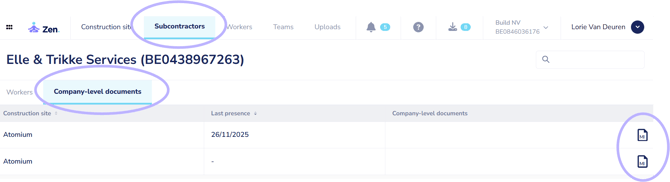
- Click on a site line to consult the linked documents. Within this overview, you can:
- view documents
- edit documents
- delete documents
An overview of the documents you can add can be found here:
https://learn.conneqtr.com/which-documents-can-i-add-in-zen